2 errors can happen:
a) “504 5.7.4 Unrecognized authentication type”
And, after was resolved, (b) happened:
b) “550 5.7.1 Client does not have permission to send as this sender”
2 errors can happen:
a) “504 5.7.4 Unrecognized authentication type”
And, after was resolved, (b) happened:
b) “550 5.7.1 Client does not have permission to send as this sender”
The result of GROUP_CONCAT is truncated to the maximum length that is given by the group_concat_max_len system variable, which has a default value of 1024.
This will cause data-destroying bugs in production. For this reason you should probably not use GROUP_CONCAT . At least you must set the value of group_concat_max_len to an insanely high value on every database server your application runs on.
Like MAX or COUNT, GROUP_CONCAT is a MySQL aggregation function you can use whenever your query contains a GROUP BY. You can use it to retrieve a comma-separated list of all values in a given column within each group.
[sql]
select client
,Month
,year
,Sum(Amount) as Amount_Total
,GROUP_CONCAT(Amount) as Amount_Detail
,GROUP_CONCAT(InvoiceNum) as Invoices
from mytable
group by Client
[/sql]
http://galhano.com/?var=1&var=2&var=3&var=4
vb sample:
[vb]
Dim arr = Request.QueryString("var").Split(",")
For Each s In arr
Response.Write("<br />var:" & var)
Next
[/vb]
Imports System.Diagnostics
[vb]
Dim sw As New Stopwatch()
sw.Start()
‘ Do the work here
sw.Stop()
Console.WriteLine("Elapsed time: {0}", sw.Elapsed.TotalMilliseconds)
[/vb]
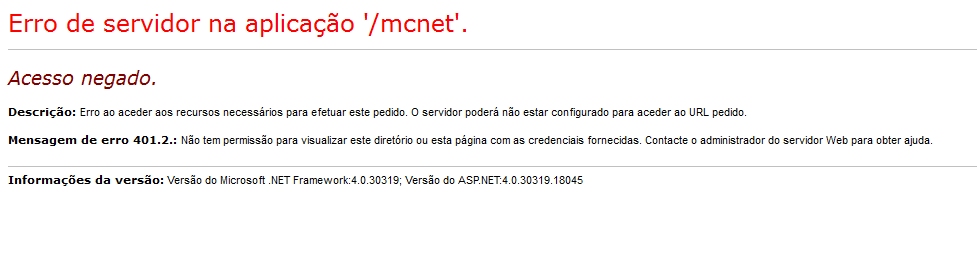
Goto IIS Console > web site properties >IIS authentication and Activate “Basic Authentication”
Just create a web.config in wordpress root dir:
[xml]
<?xml version="1.0"?>
<configuration>
<system.webServer>
<rewrite>
<rules>
<rule name="Main Rule" stopProcessing="true">
<match url=".*" />
<conditions logicalGrouping="MatchAll">
<add input="{REQUEST_FILENAME}" matchType="IsFile" negate="true" />
<add input="{REQUEST_FILENAME}" matchType="IsDirectory" negate="true" />
</conditions>
<action type="Rewrite" url="index.php" />
</rule>
</rules>
</rewrite>
</system.webServer>
</configuration>
[/xml]
Read more:
http://codex.wordpress.org/Using_Permalinks
[vb]
ListItem li =new ListItem();
li.value="PT";
li.Text="Portugal";
dropdownlist1.Items.Add(li);
[/vb]
or
[vb]
dropCategory.Items.Add( New ListItem( "Portugal", "PT" ) )
[/vb]
A primeira fase do projeto da PT na Covilhã abre hoje oficialmente as portas, inaugurando uma nova aposta da empresa que quer ser cada vez mais fornecedora de serviços de TI, transformando a operação e abrindo-se à internacionalização.
Dois anos depois de ter sido lançada a primeira pedra da construção a operadora abre a primeira fase do centro de dados que é ainda uma pequena parte do projeto global, pensado para integrar 4 edifícios. Zeinal Bava, CEO da PT Portugal e Presidente da Oi, assume na inauguração que este é um passo importante em direção à concretização do ciclo de transformação tecnológica que a PT está a desenvolver há mais de cinco anos e que sustenta uma estratégia de diferenciação da oferta da empresa.
Fix corrupted Public Folder in exchange 2003:
1. Dismount the store
2. From a command prompt, navigate to z:\program files\exchsrvr\bin folder where z: represents the drive where the exchange program files were installed.
3. Run
[ps]eseutil /p "z:\program files\exchsrvr\mdbdata\pub1.edb" [/ps]
4. Run
[ps]eseutil /d "z:\program files\exchsrvr\mdbdata\pub1.edb"[/ps]
5. Run
[ps] isinteg -s servername -fix -test alltests[/ps]
(choose the Public Folders when prompted)
6. Run the above command again to make sure isinteg has fixed all errors (last line should read 0 errors and 0 fixes).
7. Re-mount the Public Folder store.
All should be repaired now.

 Home
Home